
Dot AI Quota: Local Claude and Codex Quota Dashboard
Read Claude and Codex subscription limits locally, view them in a bilingual dashboard, and send a compact Canvas card to Quote/0 without Vibe Usage.
Dot AI Quota is a self-hosted subscription-quota dashboard for Claude and Codex. It reuses existing official-client sign-ins, shows usage percentages and reset times in a local browser, and updates explicitly configured Quote/0 Canvas content slots. It does not require Vibe Usage, a separate hosted account, or npm runtime dependencies.
Follow the English and Chinese setup instructions to view your local quota dashboard.
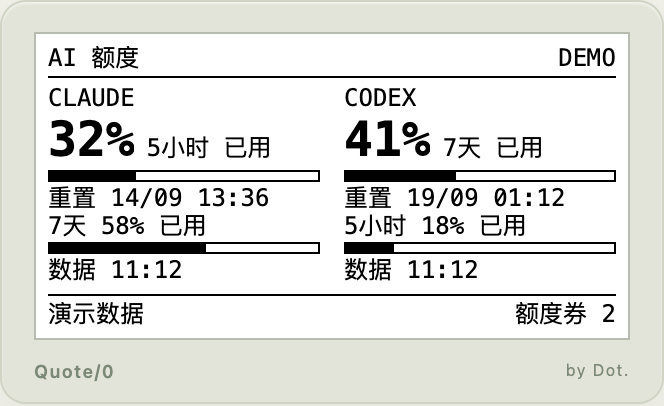
The screenshot uses demo data. The Quote/0 area shows a browser preview of the device screen.
Features
- Subscription limits: Five-hour and weekly windows when returned by the provider, Claude scoped windows, Codex plan labels and reset-credit counts
- Bilingual local dashboard: English and Chinese interfaces with remaining percentages, reset times, data timestamps and an e-ink preview
- Visible data freshness: Account-scoped local caches, explicit cached/stale states, and unknown values instead of inferred unlimited quotas
- Canvas delivery: A compact black-and-white card sent to one or more explicitly configured device/content-slot pairs
- Guided setup and scheduling: A Chinese setup wizard with hidden key input; macOS launchd, Linux systemd user timers and Windows Task Scheduler; normal pushes keep the device's content rotation
- No-account demo: Run
npm run demoto explore the interface without reading credentials, querying providers or sending to Dot
Requirements
- Node.js 24.6 or newer
- A supported subscription sign-in in Claude Code and/or Codex; Codex uses file-based
auth.json - A Dot API Key and Quote/0 device serial number for device delivery
- Canvas API content already added to the device loop in Dot. App Content Studio, with its exact
taskKey
Install the GitHub package with npm install -g https://github.com/YuHoYe/dot-ai-quota/archive/refs/heads/main.tar.gz, then run dot-ai-quota setup. The Chinese wizard detects provider sign-ins, accepts the Dot key through hidden input, lists devices and Canvas slots, saves local configuration, verifies the first push, and offers automatic scheduling. A dashboard is optional via dot-ai-quota serve; it is not required for setup or delivery. The Chinese-first README includes a copyable prompt for an AI assistant to handle configuration.
Quota and validation scope
These figures are subscription limits, not daily Token totals or API bills. The adapters use client-internal interfaces that may change. Live account queries have been tested on macOS; the repository separately documents transport tests, browser checks and physical-device acceptance status. API acceptance alone does not prove the screen has refreshed.
Did this solve your problem?
Join our community