
Image
Dot. Manual
Image
Dot. Manual
Back to home

Dot.

Install Dot. AppDiagnostic Tool

Quote

Quote/0New
Pairing Quote/0How to TapShare with Family and FriendsHow to Charge
Content Mode
Loop ContentFixed Content
TimingNewApp Clip and Tap-to-InteractNew
Screen States and Troubleshooting
Update DeviceReset NetworkReset DeviceChangelogNew
Service and RepairCustomize Quote/0

Rand

Rand/0New
Getting StartedNew
FeaturesNew
Book of AnswersFortuneMBTI GuideWooden FishCoin FlipBluetooth RemoteNewPomodoroNewClockTimerNewDice RollNumber Under TenDisplay ModeNewNFC Cards
Wi-FiCustom WallpaperSettingsHow to Charge
Update DeviceReset DeviceChangelogNew
Service and RepairCustomize Rand/0

Read

Read PicoNew
Getting StartedNew
CrossMuxNewkiikoreadNewRickyOSNewWhiteOSNewCrossLinkNewJust ReadNewPico PageNewAuraReaderNewPageRestNewif-ink OSNewThingsOSNewTake EasyNew
Demo SystemDIY Your System

Clock

ClockNew
Getting StartedDIY Your System

Content & Services

Roadmap
Content Studio
Join Content StudioRSS
Shortcuts
Co CreateNew
SoftwareNew
QuoteNew
AdventureX QR ServiceDiablo II Resurrected Terror Zone & Uber Diablo Alert ToolDot AI Quota: Local Claude and Codex Quota DashboardDot Token Dashboard: Claude Code Hub Usage RankingsDot Calendar - Weather Calendar for Quote/0Dot Mate - Quote/0 Automation SchedulerDot ServiceDot Studio: Local Content Console for Quote/0F1 Quote/0: Race Calendar and Live Standings DashboardFureru Calendar: iCal Schedule Display for Quote/0Dot Quote/0 Home Assistant IntegrationDot Quote/0 Home Assistant Dashboard CardQuote/0 Baby Dashboard: Local Baby Care TrackerInkLink Studio: Local Web Console for Quote/0Lingxi MultiScreen: Three-display controlMacau Bus ToolNewMindReset Dot MCP (Lakphy)Quote/0 SDK & CLI (MrWillCom)Quote/0 API Serverless MicroserviceQuote0 Agent BoardNewQuote/0 Bad Apple: E-Paper Video Playback ExperimentQuote/0 AI Usage DashboardQuote/0 Client Python SDKQuote/0 DeepSeek Balance Dashboardquote0-desk: NFC-Interactive Desk Console for Quote/0Quote/0 Desktop StatusQuote/0 Sonos: Now Playing BridgeQuote/0 Claude / Codex Usage DashboardQuote/0 Kimi / GLM Usage DashboardQuote/0 WeatherQuote/0 Send DemoQuote/0 + Calendar ShortcutQuote/0 Agent Skill (YangguangZhou)Quote/0 Evening SummaryQuote/0 Flash NoteQuote/0 Health ReminderQuote/0 + Holiday ShortcutQuote/0 MCP (stvlynn)Quote/0 MCP (thomaszdxsn)Quote/0 + WAY 2 Reminder ShortcutQuote/0 USB EPD BuddyQuote BambuNewQuote/0 Yearly Progress CalendarServer StatusToucanEcho / ECHO: macOS Agent with a Quote/0 Companion DisplayVibe Usage Quote/0: AI Coding Usage DashboardCastCardDotCanvasDotClientDot Crypto TickerIntelligent Poetry Weather Generation SystemInkCanvas
Rand
ReadNew
ClockNew
HardwareNew
Quote
Rand
ReadNew
Open PlatformNew
What is an APIDot SkillNewGet API KeyGet Device Serial NumberGet Device ListGet Device StatusGet TimezonesNewDevice SettingsNewSwitch to Next ContentList Device ContentControl Text ContentNewControl Image ContentNewControl Canvas ContentNew

Explore More Possibilities

Request New ContentJoin Content StudioOur Repositories

Security

Responsible Disclosure Policy

More

Service StatusService and RepairCustomize ProductsPrivacy PolicyUser AgreementContact UsAbout MindReset
Content & ServicesCo CreateNewSoftwareNewQuoteNew
Image

Macau Bus Tool

See Macau bus stops remaining, estimated arrival times, and Cotai weather on Quote/0.

RSSImprove this page

Macau Bus Tool displays Macau bus arrival information on Quote/0. Choose a route and stop to see how many stops away the nearest bus is, its estimated arrival time, the following bus, and current weather.
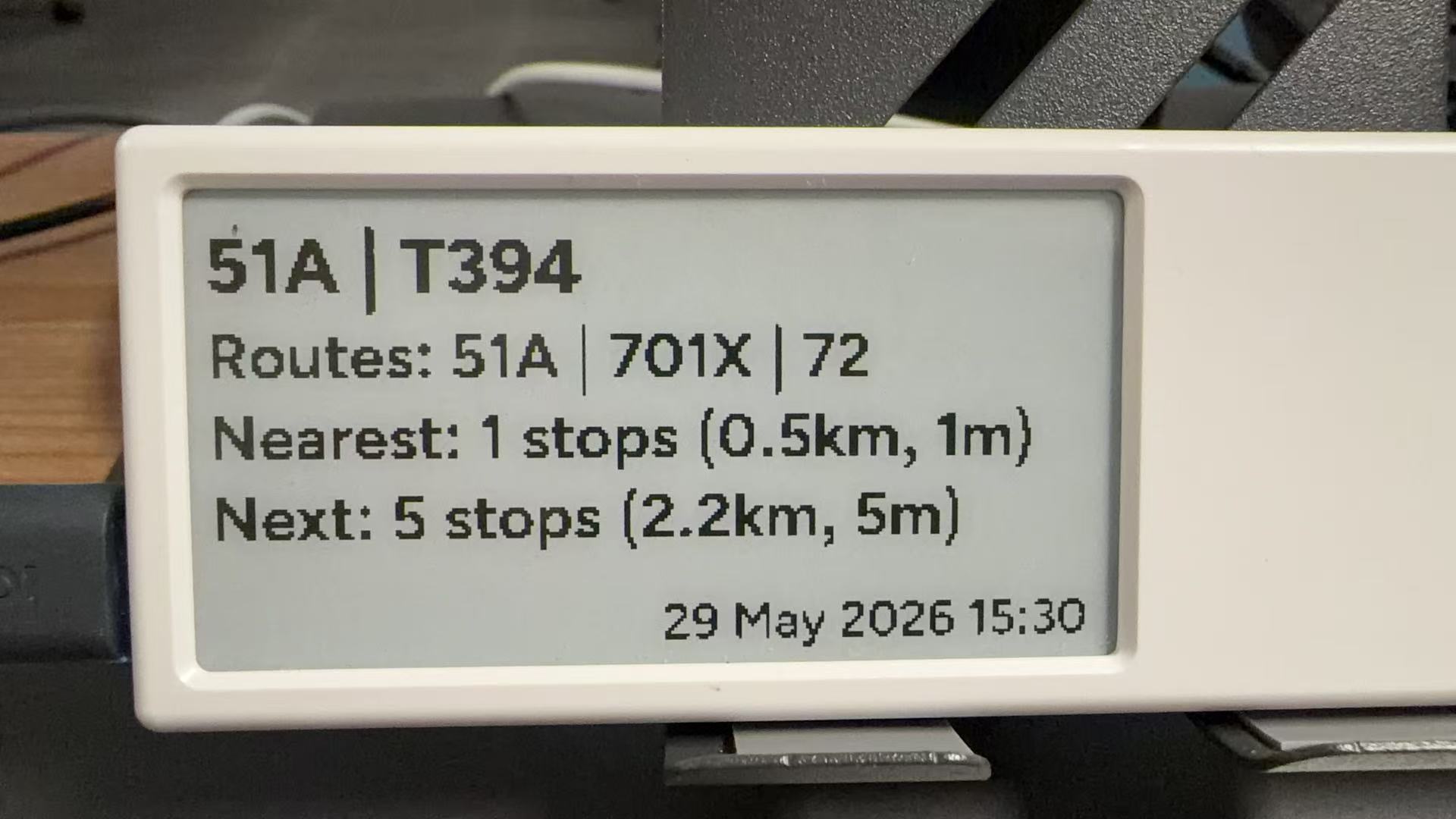
A wall-mounted Quote/0 displaying Macau bus arrival information
Bus arrival information on a Quote/0 device

Features

  • Live bus information: Uses Macau's DSAT data to show how many stops away the nearest and following buses are.
  • Distance and arrival estimates: Estimates distance and arrival time from stop coordinates. Shows stops remaining when an arrival estimate is unavailable.
  • Weather and other routes: Shows Cotai's current temperature, humidity, and weather conditions, plus other routes serving the stop.
  • Scheduled updates: Run with cron for regular updates, with a silent option. Image mode also saves a local preview.

Getting started

You need a computer or server running Python 3, an online Quote/0, a Dot. API key, and the device ID.

  1. Download the source code. For image mode, install Pillow and provide DejaVu fonts.
  2. Set QUOTE0_DEVICE_ID and QUOTE0_API_KEY in ~/.hermes/.env. Adjust SCRIPT and the font directory in quote0_send_bus.py to match your installation. The query script defaults to ~/.hermes/macau_bus_arrivals.py.
  3. Add Image API to the device's loop in the Dot. App Content Studio. Add Text API if using text mode.
  4. Run from the project directory, replacing the route and stop as needed:
python3 quote0_send_bus.py 51A T394

The default mode renders a 296 × 152 monochrome image. Add --text for text mode or --silent to suppress command-line output. See the README for scheduling and other queries.

Usage notes

Arrival times are estimates based on stop coordinates and a fixed average speed, rather than official arrival predictions. The weather location defaults to Cotai. Updates require the host computer or server to stay online with access to DSAT, Open-Meteo, and the Dot. API.

Did this solve your problem?

Join our community

Lingxi MultiScreen: Three-display control

Manage Linx68, Rand/0, and Quote/0 displays from one macOS app, with composable boards, status cards, and scheduled pushes.

MindReset Dot MCP (Lakphy)

Next

Contents

FeaturesGetting startedUsage notes
GitHub

csloz/macau-bus

—